Which documents can VerifyPDF check
VerifyPDF checks financial and official PDFs like bank statements, payslips and tax returns, plus identity documents such as passports and IDs from a clear image.
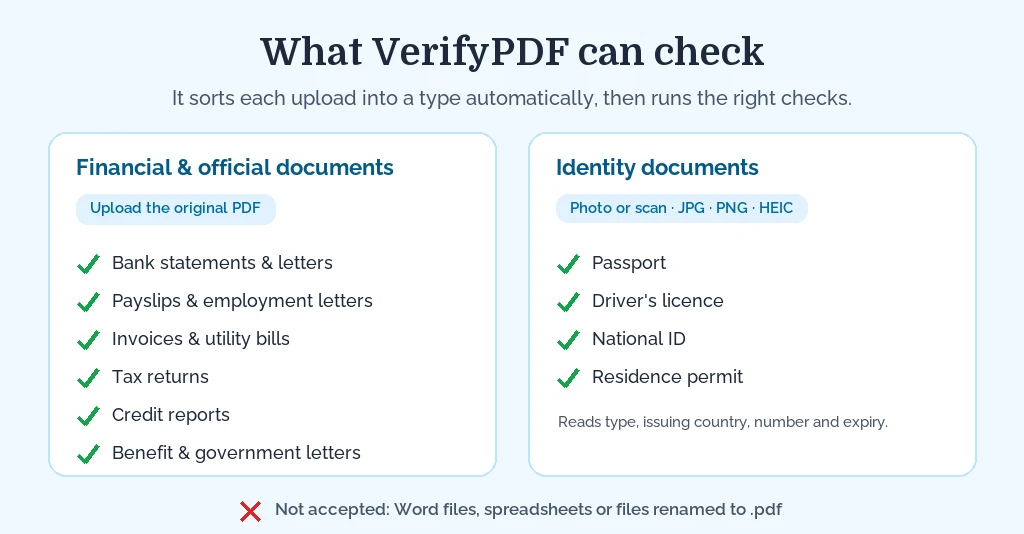
VerifyPDF works on two different kinds of upload: original PDFs for digital financial and official documents, and clear images for physical identity documents. It automatically sorts each upload into a type, then runs the relevant checks. You do not pick the type yourself.
What VerifyPDF works best on
VerifyPDF is most effective when the upload matches the way the document normally exists.
- For financial and official documents, upload the original computer-generated PDF downloaded from the bank, employer, tax portal, accounting system or issuer. That preserves the metadata, text layer and structure VerifyPDF inspects.
- For identity documents, upload a clear photo or scan of the physical document in JPG, PNG or HEIC/HEIF. A passport, driver’s licence, national ID or residence permit is a physical object, so a good image is the right input.
Document types VerifyPDF recognizes
VerifyPDF auto-classifies these documents:
- Bank statements
- Bank letters
- Invoices, including utility bills like electricity, water, gas, internet and phone
- Payslips
- Employment letters
- Tax returns
- Credit reports
- Benefit letters
- Other government documents
- Other, used as a fallback when the document does not match the types above
If VerifyPDF cannot match a clear type, it labels the document other and still analyzes the file. The result may be less specific than it is for a recognized document type.
Supported file types
VerifyPDF accepts two kinds of upload, and the right format depends on the document.
- Computer-generated documents (bank statements, payslips, invoices, tax returns and the other types above) should be uploaded as the original PDF, downloaded directly from the bank, employer, portal or issuer. That keeps the file structure VerifyPDF inspects.
- Identity documents (passport, driver’s licence, national ID, residence permit) should be uploaded as a clear photo or scan in JPG, PNG or HEIC/HEIF. These are physical documents, so an image of the document is what VerifyPDF needs.
What is not supported: Word files, spreadsheets, and files renamed to .pdf that are not really PDFs. Converting an unsupported file to PDF does not recreate the original structure.
Identity documents
VerifyPDF does check identity documents. It analyzes passports, driver’s licences, national IDs and residence permits from a clear photo or scan, and pulls out the document type, issuing country, document number and expiry date.
This is document verification, not a full identity-proofing flow. VerifyPDF checks the submitted document image and visible document details. It does not compare the holder to a selfie, run liveness detection or prove that the person submitting the file is the document holder.
Because these are physical documents, the process differs from a PDF bank statement. See Verify an identity document for how to capture a good photo and what VerifyPDF extracts.
What to do next
- Submit a document to run your first check.
- Verify an identity document from a photo or scan.
- Learn how to read your verification result.